
Performance & Growth Insights: Social Media Analytics Guide
Performance & Growth Insights
Get detailed reports on audience engagement, reach, and growth for each of your accounts across different platforms. The analytics screen connects to the unified monitoring center (Dashboard) to translate all your posts and ad campaigns on Facebook, Instagram, and Google Business into precise growth numbers and indicators.
Key Analysis Indicators and Integration with the Main Dashboard
Measure search views, calls, and bookings coming directly from the maps profile and Google Business.
Google Business ProfileTrack results and expenses of paid ads via integrated (Facebook Ads Report) and (Google Ads Report) cards.
Multi-Ad AnalyticsLink social media interactions with sales productivity to know the average deal closing time and total value.
Conversion & VelocityRead landing page visitors via Google Analytics while measuring campaign delivery quality in the (Email Health Report).
Web & Delivery HealthSteps to View and Analyze Performance in the Platform
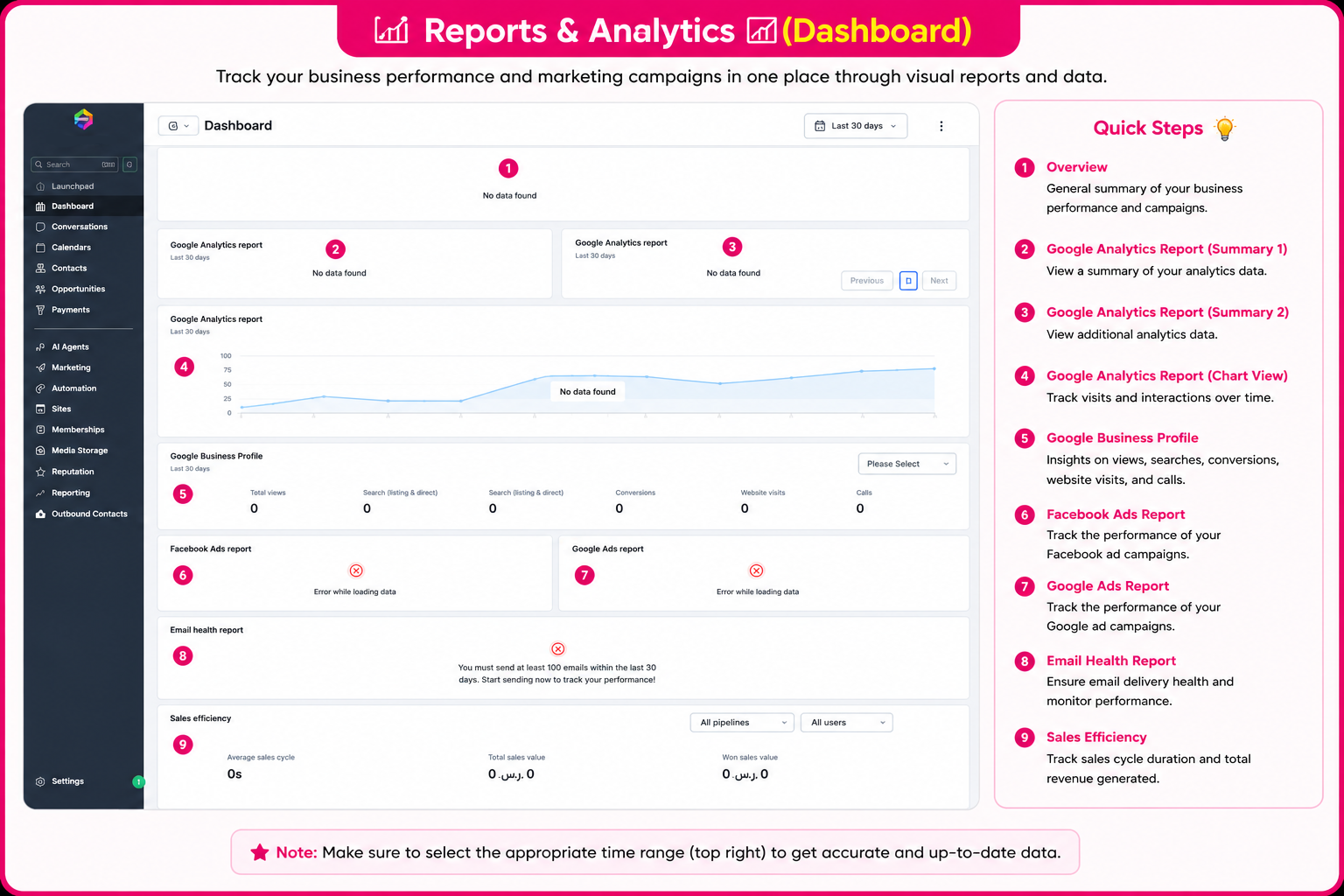
You can monitor your account and campaign results via the platform interface through the following steps:
Dashboard Interface in the Platform
Explore the direct illustrative diagram for comprehensive report cards and analytics:
Frequently Asked Questions (FAQ) About Performance Insights
Yes, the cards link directly to the official Facebook and Google APIs to update engagement and visit numbers automatically.
It grants you a true view of the number of clients who found your geographical location or called you via maps and search.
The system requires a minimum sending threshold to reach a correct and precise reading of invoice and message delivery rates to the server.
It calculates the average time spent converting a follower or lead from the first contact into a completed and paid deal.
Talk to Media SaleX AI Assistant
Do you want the AI assistant to analyze your dashboard numbers and provide suggestions to increase your profits and lower ad costs? Talk to it now!
Talk to Media SaleX AI Assistant