
Dashboard | Media SaleX CRM AI User Guide
Dashboard
The intelligent command center for Media SaleX. Designed to provide you with a comprehensive overview of your business performance, from sales opportunity status to advertising channel reports and digital engagement.
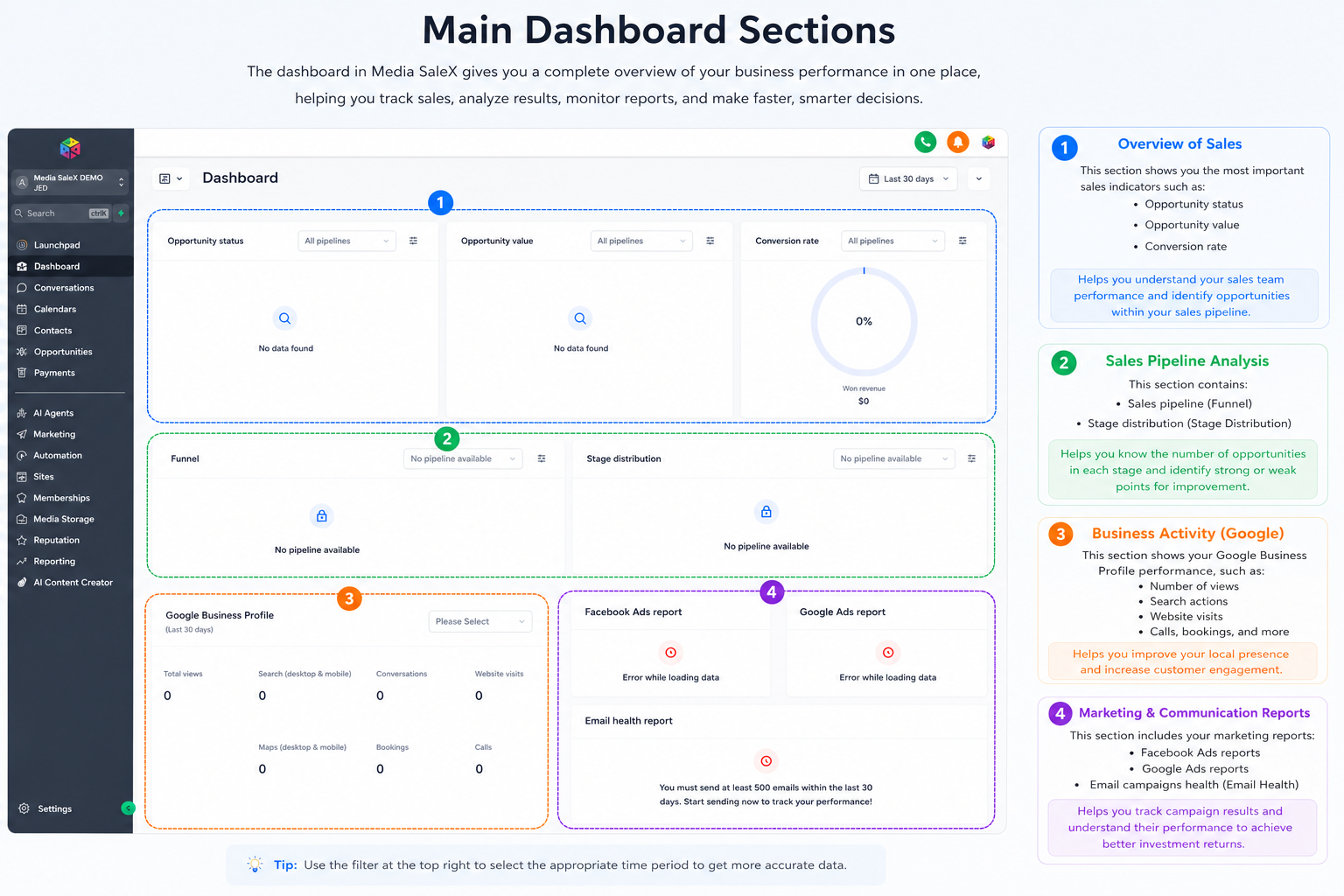
Monitor the status of sales opportunities, their financial value, and conversion rates for the last 30 days accurately.
Direct management of pending tasks and required manual actions (such as phone calls or SMS messages) to ensure no opportunity is lost.
Integrate Google Analytics reports, Google Business Profile data, and Facebook ads into a single screen.
Measure the speed of closing deals and their average value to help you understand your monthly revenue growth pace.
FAQ
How do I control the time period for reports? You can easily change the time range via the filter menu at the top right of the dashboard (e.g., Last 30 days).
What do the “Data loading error” notifications mean? These notifications appear in campaign reports when you need to connect your ad account or when data is in the synchronization phase.
Chat with Media SaleX AI Assistant
Do you want to analyze a specific pattern in your data? The Media SaleX assistant is ready to turn these numbers into actionable plans immediately.
Chat with Media SaleX AI Assistant