
Chat Management Guide | Organize & Track Customer Conversations
Chat Management
Organize your daily interactions smartly. This section gives you professional tools for replying, archiving, and tracking chat statuses to ensure no sales opportunity is missed.
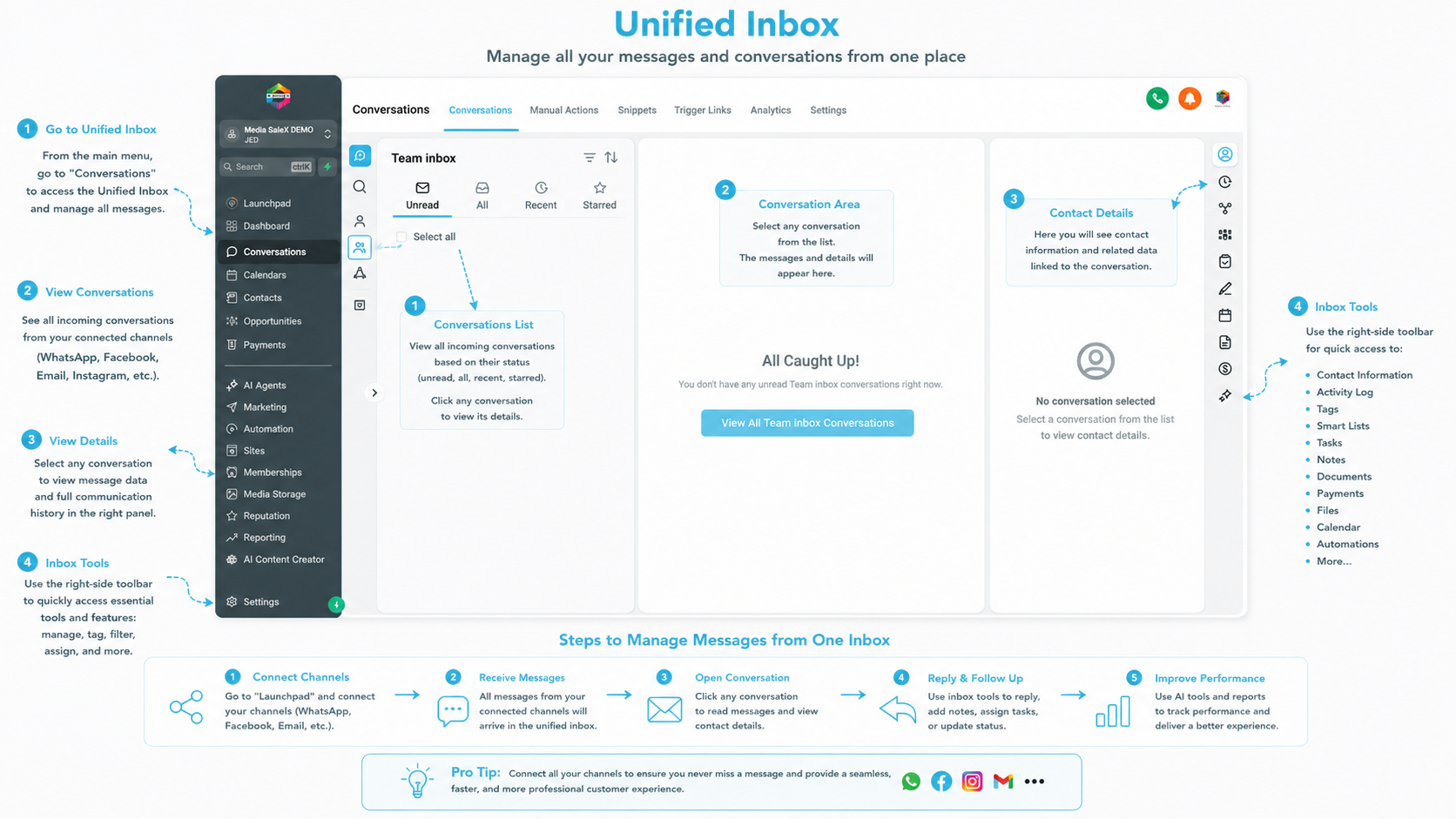
Click on the image to open it in full size (available for desktop users).
Classify chats into (open, pending, or closed) to ensure continuous follow-up for every customer request.
Control workflow by archiving finished chats or tagging important messages as “unread” to return to them later.
Use built-in filters to quickly display “unread” or “starred” messages with extreme speed.
Important Questions About Chat Management
How do I ensure chat follow-up? You can use the “Pending” status to keep the chat in the main list until the customer’s inquiry is resolved.
Can I restore an archived chat? Yes, all archived chats remain saved in the archive log and can be accessed and restored at any time.
Does chat management affect team performance? Absolutely, good organization prevents overlap and clearly defines responsibilities for each chat.
Talk to Media SaleX AI Assistant
Do you need a suggested organization strategy for your chats? The assistant bot is here to analyze your work patterns and suggest the best organization steps.
Talk to Media SaleX AI Assistant