
Interactive Dashboard: Key Performance Indicators & Analytics Guide
Interactive Dashboard
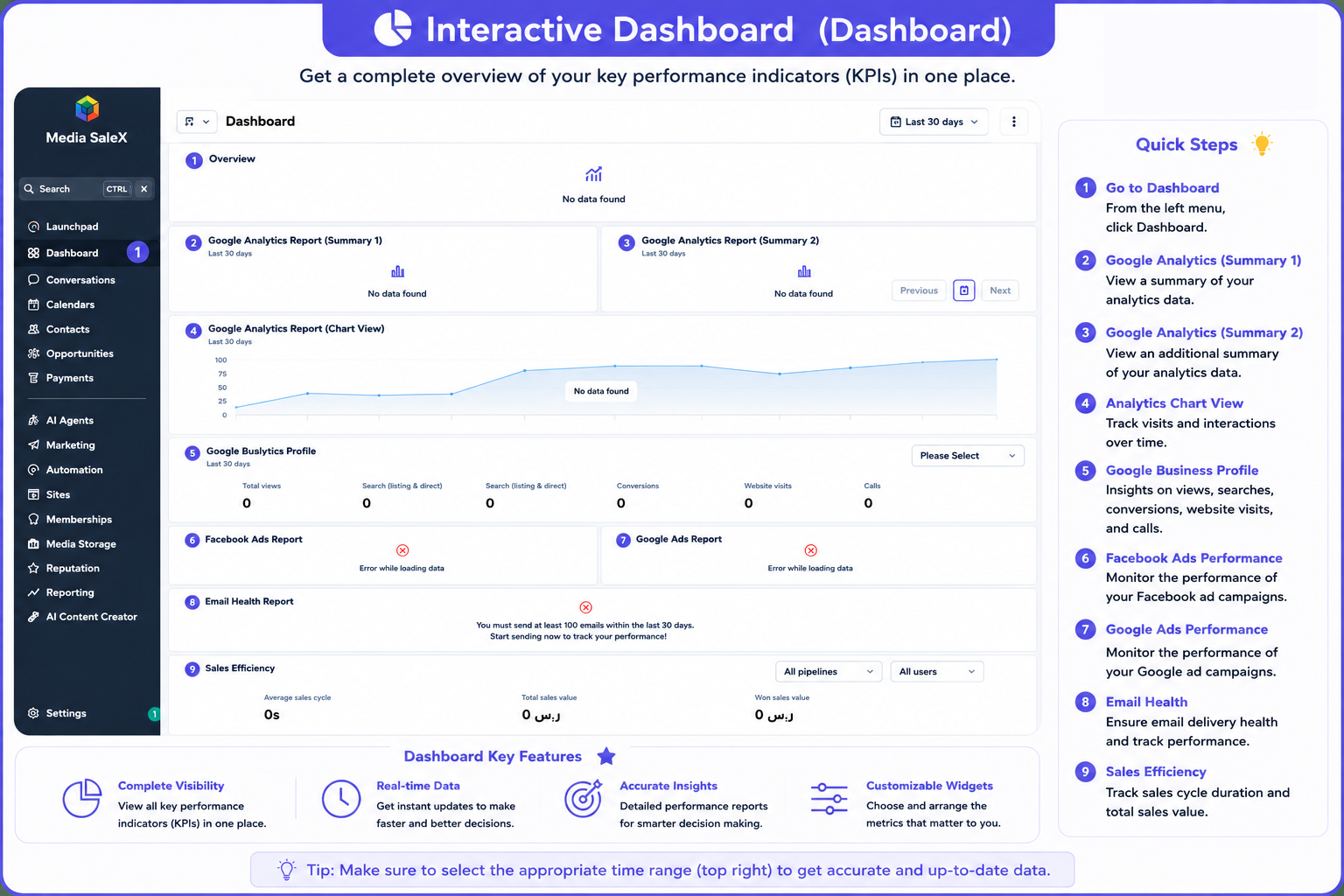
A comprehensive and direct overview of Key Performance Indicators (KPIs) for your business in one place. The dashboard inside Media SaleX gives you a unified real-time view of sales results, website visitors, performance of paid ads on Facebook and Google, and map profile interactions to empower you to make smart and fast managerial decisions.
Key Performance Indicators Aggregated on the Main Dashboard
Monitor average deal closing time, total sales value, and monthly customer conversion speed.
Sales Velocity & ValueTrack store views on maps and search, phone call counts, bookings, and direct website visits.
Google Business ProfileReal-time and direct tracking of advertising campaign budgets and returns across Meta and Google Ads networks in a single screen.
Ads Performance CardsMeasure site visitors via Google Analytics and ensure campaign delivery quality in the Email Health Report.
Web & Delivery HealthPractical Steps to Access and Use the Main Dashboard
You can review all your business analytics via the platform interface through the following steps:
Dashboard Interface in the Platform
Explore the direct illustrative diagram for comprehensive report cards and analytics:
Frequently Asked Questions (FAQ) About Dashboard
Yes, cards link directly with Google, Facebook, and sales processors to provide instantly updated figures.
Yes, the dashboard displays all sales values and completed deals in the approved local currency of your account.
Yes, the (All users) option lets you filter the dashboard to view achievements and sales velocity of a specific employee or agent.
This requires completing the connection of the ad account (Facebook/Google Ads) or sending the minimum threshold of email messages to enable reading.
Talk to Media SaleX AI Assistant
Do you want the AI assistant to read your dashboard analytics and generate an executive summary for management? Talk to it now!
Talk to Media SaleX AI Assistant