
Broadcast Campaigns | Media SaleX CRM
Broadcasts & Campaigns
Transform your communication from individual messages into large-scale marketing campaigns. The Broadcast tool is your primary engine for reaching your audience at the right time.
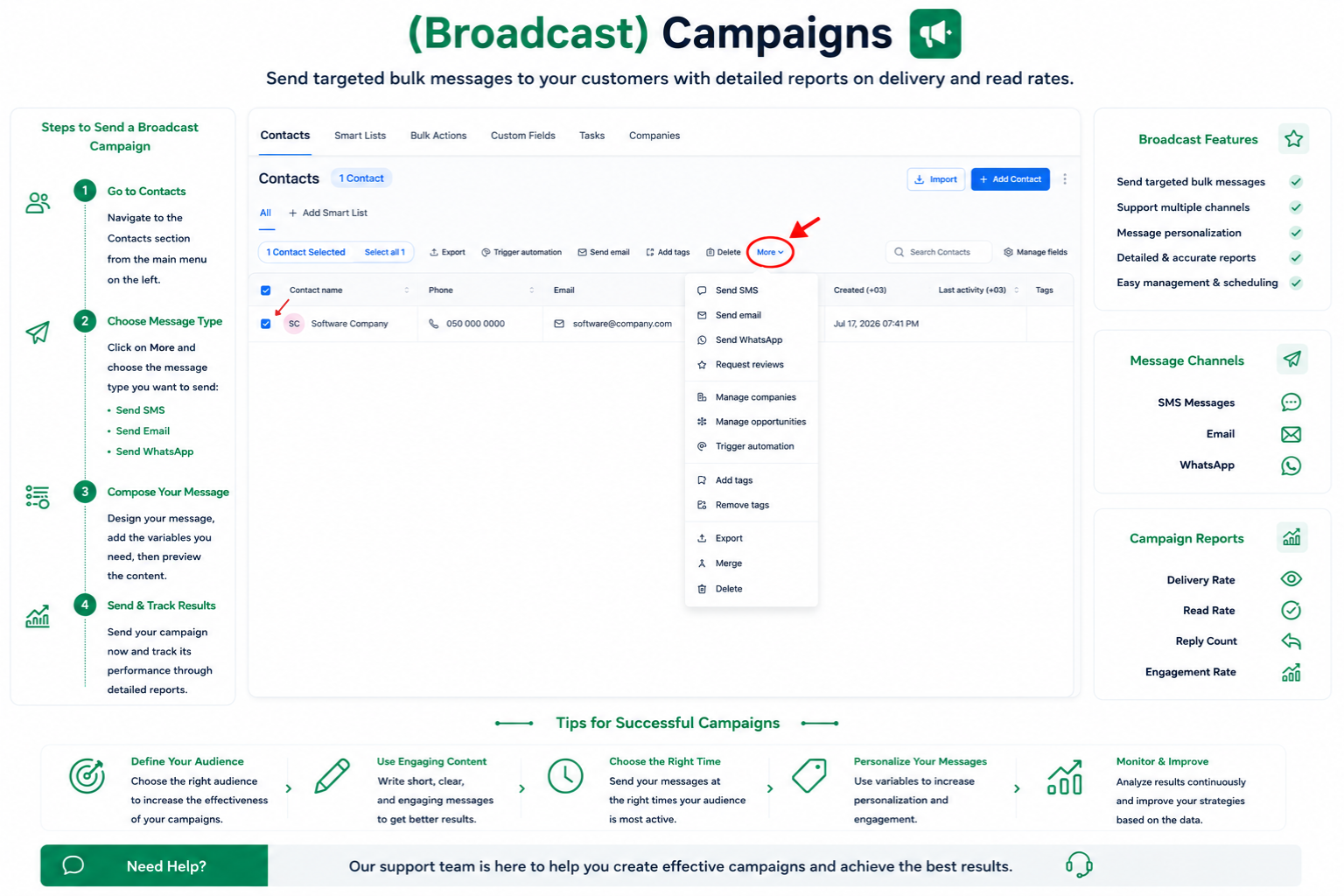
Use “Smart Lists” in the Contacts section to precisely define your customer segment before sending your campaign.
Through the “Bulk Actions” tab, you can select your list and choose to send a WhatsApp message immediately or schedule it for later.
When setting up a broadcast, the system will ask you to choose one of the approved Templates to ensure the message complies with Meta’s policies.
After sending, you can track the operation logs in “Bulk Actions” to see the message delivery status and customer interaction.
Assistant Tip
Golden Tip: Start with small broadcast campaigns (A/B Testing) to test which templates achieve the highest response before sending them to your entire database.
Talk to Media SaleX AI Assistant
Ready to launch your first broadcast campaign? The Media SaleX assistant is with you to ensure lists are set up professionally.